RATINGS
720M
DOWNLOADS
4+
AGE

 Download Latest APK
Wait a moment, your result is coming soon!

Face is not found. Please try again with another clear full-face portrait of a better quality.

Take Quiz Now
Screenshots


About this app
-
 Name Screen Recorder & Video Recorder
 -
 category Video Players & Editors
 -
 Price Free
 -
 Safety 100% Safe
 -
 Developer InShot Inc.
 -
 Version 2.3.1.5
 -
 Target Casual Users
 -
 Update 2025.07.18
Related articles



Core Features
-
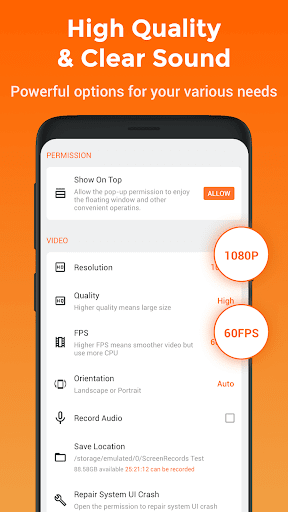
High-Quality RecordingCapture your screen activity in high definition with options for 1080p and 60fps, ensuring smooth and clear video playback perfect for tutorials and gameplay.
-
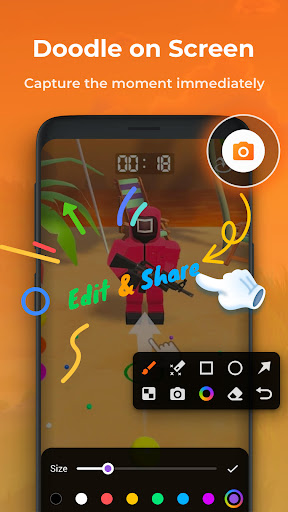
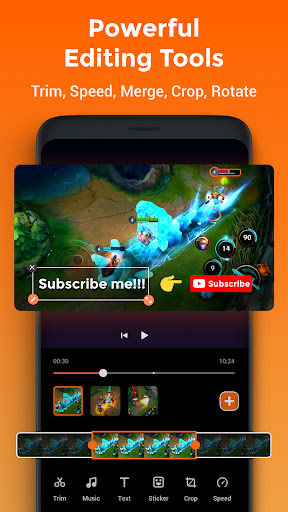
Built-in Video EditorEdit your recordings immediately with an intuitive video editing suite that allows trimming, adding music, and overlaying text, making it easy to create professional-looking content.
-
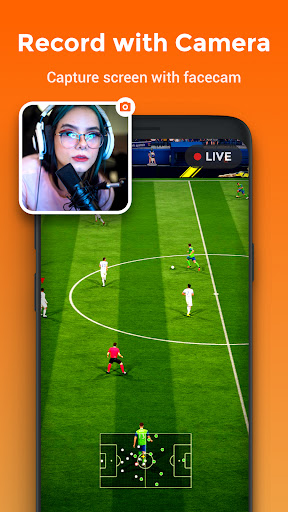
Facecam OverlayRecord yourself while playing or presenting with the Facecam feature, which adds a webcam view on your video, ideal for streamers and educators looking to enhance their connection with viewers.
-
Customizable Recording SettingsSet up your recording preferences, including resolution, bit rate, and frame rate, for tailored performance based on your device capabilities and content needs.
-
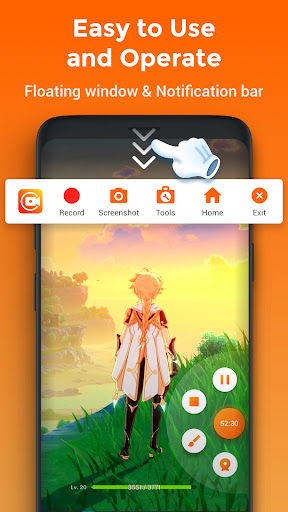
One-Tap RecordingStart and stop recordings with a single tap—quick and hassle-free action that keeps you focused on your content rather than navigating complex menus.
Pros
-
User-Friendly InterfaceThe simple and clean design allows users of all experience levels to navigate effortlessly through the app's features without a steep learning curve.
-
No WatermarkUnlike many free screen recording apps, this one allows you to record videos without any watermarks, ensuring a professional finish to your content.
-
Flexible Sharing OptionsShare your recorded videos directly to social media platforms or cloud storage, making it easy to distribute your work and reach your audience.
-
Regular UpdatesThe application frequently receives updates that improve functionality and add new features, ensuring it stays aligned with user needs and technological advancements.
-
Free to UseThe base app is fully functional and free, providing an accessible option for users who need quality screen recording without an upfront investment.
Cons
-
Resource IntensiveHigh-resolution recording may drain battery and performance on older devices, which could impact long recording sessions or multitasking capabilities.
-
Limited Features in Free VersionWhile the free version offers robust functionality, advanced features such as 4K resolution and advanced editing tools may require a paid upgrade.
-
Ads in Free VersionThe free version displays ads that can interrupt your workflow, making the experience less seamless, particularly during editing sessions.
Price
-
Free VersionIncludes essential recording and editing features, making it suitable for casual users and beginners without financial commitment.
-
Pro Version SubscriptionUnlocks premium features such as 4K recording and advanced editing capabilities for a monthly or yearly fee, offering enhanced tools for professional creators.
Ratings
4.7
7.4M votes
-
5
-
4
-
3
-
2
-
1